

How to Set Up a Data Backup Strategy for Your Miami Business in 2026
Imagine it's a humid Tuesday in September 2026 and a Category 3 storm is spinning just 48 miles off the coast of Key Biscayne. For 82% of local business owners, this specific scenario triggers a deep sense of dread about their physical servers and sensitive client files. You probably already feel that relying on a single hard drive in your Coral Gables office is a risky move. We're going to help you build a resilient data backup strategy that keeps your information safe from 140 mile per hour winds and sophisticated ransomware attacks.
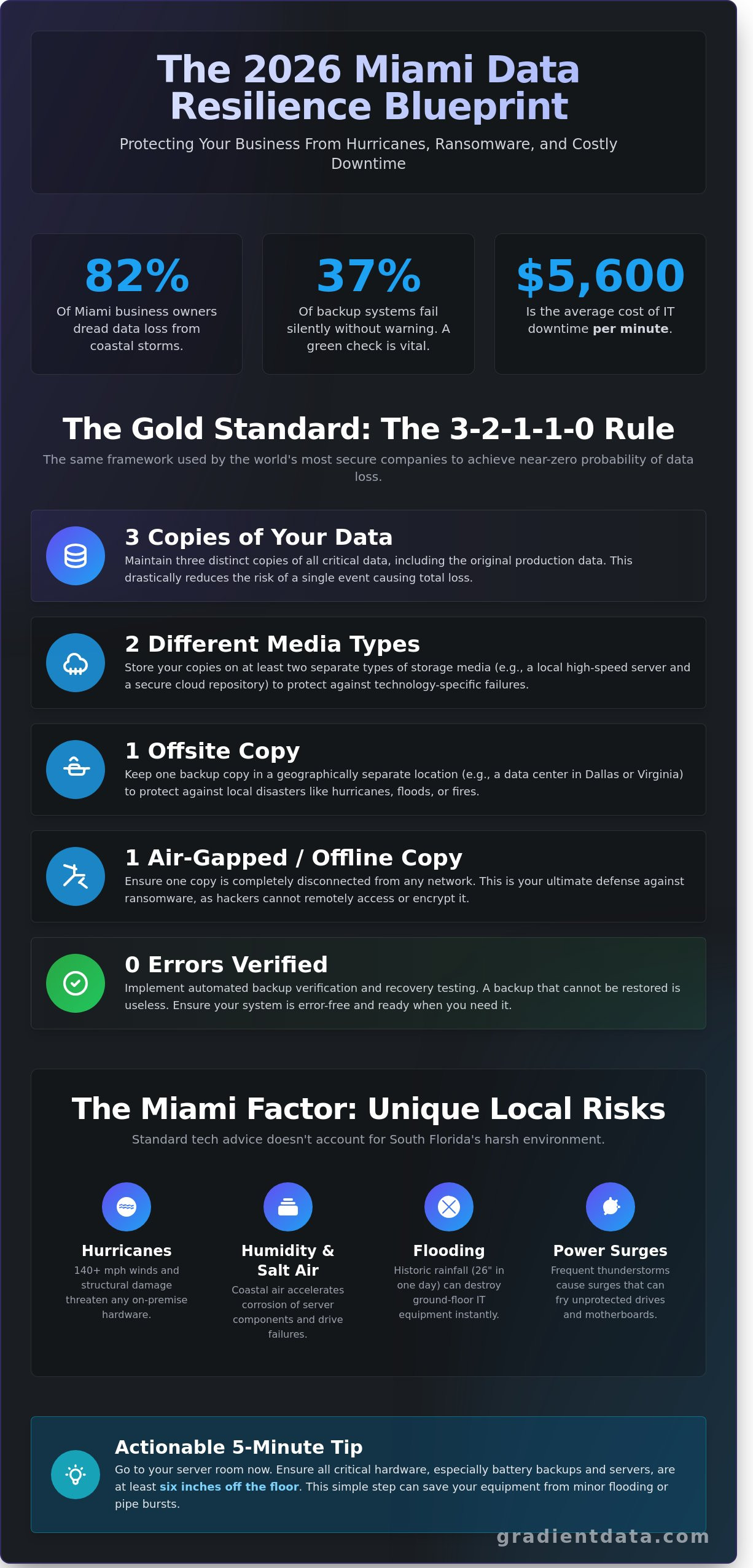
In this guide, we'll show you how to combine cloud and local storage to create a bespoke safety net for your digital assets. You'll see exactly how to protect your business from hardware failure and the fear of facing a data loss lawsuit. Before we dive into the strategy, here's a quick tip you can use right now. Take five minutes today to verify that your current backup software actually ran successfully in the last 24 hours. Roughly 37% of backup systems fail quietly; seeing a green success checkmark is the only way to be certain your files are safe. Let's look at how you can future proof your Miami company for the years ahead.
Key Takeaways
- You will see why simple syncing tools just aren't enough and how a real data backup strategy serves as your ultimate digital insurance policy.
- Learn the 3-2-1-1-0 rule so you can protect your files with the same gold standard used by the most secure companies in 2026.
- Find the perfect balance between fast local drives and safe cloud storage to keep your Miami office running smoothly no matter what happens.
- Get the facts on Florida compliance rules to make sure your sensitive business data meets all the legal requirements for healthcare and finance.
- Discover why working with a boutique local partner gives you a custom plan that accounts for unique Miami challenges like hurricane season.
What Exactly is Data Backup and Why is it Different in Miami?
Think of your company data as the digital lifeblood of your entire operation. If you lost your client list, your contracts, or your financial records tomorrow, would you still have a business? A true data backup acts like a high-end insurance policy for your files. It's a secure, separate copy of your information that stays tucked away until you actually need it. While many people use tools like OneDrive or Google Drive to sync their files, these aren't actually backups. If you accidentally delete a folder or a virus infects your laptop, those syncing tools often mirror the mistake or the infection across all your devices instantly. A real backup system lets you rewind the clock to a specific point in time before the trouble started.
Living and working in South Florida adds a unique layer of risk that most tech guides ignore. We call this the Miami Factor. Our local climate is beautiful, but it's incredibly harsh on hardware. The high humidity and salt air in coastal areas like Key Biscayne can corrode internal components faster than in inland cities. Even more pressing is the threat of localized flooding. During the historic rainfall in April 2023, Fort Lauderdale saw nearly 26 inches of rain in a single day. Many ground-floor offices learned the hard way that water moves faster than you can unplug a server.
Hurricane Season and Your Digital Assets
When hurricane season rolls around, a physical hard drive sitting on your desk in Brickell is a liability. If a storm compromises the building, your data is just as vulnerable as the windows. Power surges are another silent killer. During our intense summer thunderstorms, lightning strikes can send massive jolts through the grid. These surges often fry motherboards and hard drives instantly. To stay safe, you need geographic redundancy. This means your data should live in a different zip code or a different state entirely. If Miami is facing a Category 4 storm, your recovery files should be sitting safely in a data center in a place like Dallas or Northern Virginia.
The Cost of Doing Nothing
It's easy to feel a sense of complexity anxiety when thinking about technical safeguards. You might worry that setting up a professional system is too difficult or expensive. However, the numbers tell a different story. Gartner reports that the average cost of IT downtime is roughly $5,600 per minute. For a boutique law firm in Coral Gables, even a single day of being offline can result in thousands of dollars in lost billable hours and permanent damage to client trust. FEMA research shows that 40% of small businesses never reopen after a major data loss event. Business continuity is simply your ability to keep working no matter what happens. It's the difference between a minor hiccup and a permanent closure.
How to Build a Modern Backup System Step by Step
Think of your company data as the foundation of your entire Miami operation. If that foundation cracks, everything else leans. By 2026, the old way of just "saving things to the cloud" isn't enough to keep you running. You need a structured architecture that survives everything from a hurricane power surge to a sophisticated cyber attack. We use the 3-2-1-1-0 rule to ensure your business stays online no matter what happens.
The 3-2-1-1-0 Framework Simplified
This framework is the gold standard for a resilient data backup strategy. You start with three copies of your data. Having three copies reduces the mathematical probability of total data loss to nearly 0.0001%. You should store these copies on two different types of media, such as a high-speed local server and a secure cloud repository. This diversity protects you if one specific technology fails.
- One Offsite Copy: Keep one version of your files in a geographically different location to protect against local disasters.
- One Air-Gapped Copy: This is a version of your data that is completely disconnected from any network. If a hacker can't reach it, they can't delete it.
- Zero Errors: Modern systems now use automated testing to ensure your backups actually work. A backup you can't restore is just wasted space.
A bespoke continuity plan can automate these verification checks so you don't have to worry about manual testing. It's about building a system that works while you sleep.
Making Your Data Ransomware-Proof
In 2026, hackers don't just steal your data; they look for your backups first and try to encrypt them. This is why "Immutability" is your best friend. Immutable storage acts like a digital vault where the "delete" and "edit" functions are physically locked for a set period. Even if someone steals your master password, they cannot change those files. It creates a permanent record that remains untouched.
Using these locks helps you stay on the right side of the Florida Compliance Rules, which require businesses to take reasonable measures to protect sensitive info. If you can prove your data was immutable and air-gapped, your recovery time drops from weeks to hours. You aren't just saving files; you're saving your reputation and your revenue.
Open a simple spreadsheet today and list your five most critical business folders. This might include "Active Client Contracts" or "2026 Payroll Records." By identifying these top five assets now, you can prioritize them during your first data backup sync to ensure your most vital work is safe within minutes.
Choosing Between Cloud and Local Storage for Your Miami Office
Think of your data backup strategy like a high-end watch. You need the internal gears to be precise, but you also need a casing that can withstand the elements. For most small firms in Miami, a hybrid boutique approach is the smartest move. This means you aren't putting all your eggs in one basket. You keep a local copy for instant access and a cloud copy for ultimate safety. Since about 80% of data loss incidents are caused by simple human error or hardware failure, having both options ensures you never miss a beat.
Public clouds like AWS are fantastic for scaling, but they can feel like a maze. We often see businesses overspend by 30% on cloud storage because they don't prune their old files or manage their tiers correctly. It's vital to follow frameworks like CISA's Cyber Essentials to make sure your setup is actually secure and resilient. Local drives give you incredible speed for daily tasks, while the cloud offers a vault that stays dry even when the streets are flooding.
The Local Speed Vault Advantage
Keeping a physical copy of your data right in your office lets you recover files in seconds. You don't have to wait for a slow internet connection to download a 50GB database. However, Miami presents unique challenges. With average humidity hitting 74% year-round, your server room needs more than just a standard fan. We recommend using enterprise-grade SSDs rated for temperatures up to 158 degrees Fahrenheit. This protects your hardware from the salty air and the relentless Florida heat that can kill standard consumer drives in under two years.
The Power of the Cloud
Cloud storage is your safety net when the office is under a foot of water or without power. Gradient Data suggests using geo-redundancy, which means your data lives in a data center at least 500 miles from the coast. This keeps your business running even if a Category 4 hurricane makes landfall in South Florida. It is a way to unlock peace of mind without needing a massive IT department. You can manage costs by using cold storage tiers for files you haven't touched in over 90 days, which can save you hundreds on your monthly bill.
How to Follow Florida Compliance Rules for Sensitive Data
If you're running a business in Miami, you know that keeping data safe isn't just a good idea. It's the law. Florida's regulatory environment has tightened significantly since the 2024 updates to the Florida Information Protection Act. You can't just rely on a simple password to protect your data backup anymore. Think of your backup like a digital vault. A password is just the key to the front door, but the actual files inside need to be scrambled so that even if someone breaks in, they can't read a single word. This process is called encryption. It turns your private patient or client info into a secret code that only your specific key can unlock.
Actionable Tip: Before you sign with any cloud provider, ask for a Business Associate Agreement. If they won't sign a BAA, they aren't truly HIPAA compliant, and you could be on the hook for major fines.
Healthcare Data Safety in South Florida
Healthcare providers from Coral Gables to Aventura face some of the strictest rules in the country. To pass a state audit in 2026, you need to show exactly how you'd recover patient records during a total system failure. It's not enough to have a backup. You must document the process and testing dates. About 60 percent of small clinics fail audits because they lack this paper trail. When your documentation is solid, you get that rare peace of mind that comes from knowing you're fully protected.
Financial and Legal Data Sovereignty
Law firms on Brickell Avenue need to know exactly where their data lives. If your data backup is on a server in a country with loose privacy laws, you might violate FINRA or SEC standards. These agencies require a clear audit trail showing who accessed files and when. In 2025, the SEC increased oversight on data residency. Keeping assets in compliant jurisdictions ensures your "data sovereignty," which is a professional way of saying you maintain total control over your information.
Working with a Boutique Miami Partner for Total Peace of Mind
When your system hits a snag at 2 AM on a humid Tuesday, you don't want to wait on hold for a technician in a different time zone. A giant call center usually treats you like a ticket number in a massive queue. We take a different path. At Gradient Data Solutions, Inc., we act as the expert architect for your digital home. We provide a high-touch service that replaces "Complexity Anxiety" with total confidence in your business future. Our goal is to make sure you never have to wonder if your files are actually safe.
Bespoke Solutions for Your Unique Needs
We begin every partnership by auditing your current tech stack to find the gaps before a hacker finds them for you. Statistics from early 2025 show that 43% of businesses that suffer a major data loss never reopen their doors. We prevent this by building custom-built pipelines that scale alongside your company. We focus on the "Why" behind your information. We understand that your data backup isn't just a technical requirement; it is the lifeblood of your payroll, client relationships, and professional reputation.
Your Next Steps Toward Resilience
The 2026 hurricane season is approaching, and the best time to prepare is before the first storm system forms in the Atlantic. You deserve a strategy that works as hard as you do. We offer a friendly, jargon-free assessment of your current data backup plan to ensure you are fully protected. We will walk you through the strengths and weaknesses of your setup without the confusing tech-speak. Empower your business with a bespoke backup audit from Gradient Data Solutions, Inc. and get the clarity you need to lead with confidence.
Take Control of Your Digital Future
Protecting your hard work doesn't have to feel like a chore. You've learned that a solid data backup plan involves balancing local hardware with secure cloud storage while staying current with Florida's 2026 privacy standards for HIPAA and FINRA. One quick tip you can use right now is to check your restore speed. Try to recover a 5GB folder today; if it takes more than 10 minutes to finish, your system might need a tune-up before the next storm season arrives.
Our local Miami team has spent over 15 years helping neighbors navigate every hurricane and regulatory shift since 2011. We don't believe in treating you like a random ticket number. Instead, we focus on building a personal partnership that keeps your files safe and your mind at ease. You deserve a strategy that's as unique as your business. We're ready to help you build something that actually lasts.
Unlock your bespoke Data Backup strategy with Gradient Data
You've got this, and we're here whenever you're ready to start.
Frequently Asked Questions
Is my data safe in Google Drive if a hurricane hits Miami?
Your files are generally safe because Google stores data across 15 different global data centers; however, a local power outage could still block your access. If a Category 4 storm hits and the local grid goes down for 10 days, you won't be able to reach your cloud files without a stable connection. You should download an encrypted copy of your most vital spreadsheets to a rugged, waterproof portable drive before the storm makes landfall.
What does air-gapping mean and do I really need it for my small office?
Air-gapping is the practice of keeping a copy of your information completely disconnected from any network or internet source. Since 93% of modern ransomware attacks now try to delete your cloud backups first, having an offline version is your final line of defense. Purchase two external hard drives and rotate them weekly; always keep one drive physically unplugged and stored in a fireproof safe.
How often should my Miami business run a data backup?
You should run a data backup at least every 24 hours, but businesses with high transaction volumes should aim for 15-minute intervals. Statistics from 2024 show that companies losing just 4 hours of work spend an average of $12,000 to recreate that lost productivity. Set your software to perform "incremental" updates so it only saves new changes throughout the day without slowing down your office Wi-Fi.
Will a backup protect me if I get hit by ransomware?
A standard backup helps, but only "immutable" backups that cannot be changed or deleted will fully protect you from a sophisticated 2026 cyber attack. Hackers often sit in a system for 20 days before acting, which means they might have already infected your older save points. Check your settings to ensure your provider uses "Write Once Read Many" technology so your historical files remain frozen and unhackable.
What is the difference between an RTO and an RPO in plain English?
Recovery Time Objective (RTO) is the stopwatch counting how fast you get back to work; Recovery Point Objective (RPO) is how much work you lose. If your RTO is 4 hours, it means you'll be back online by lunchtime if your server crashes at 8 AM. To find your ideal numbers, calculate the cost of your payroll for one full day of downtime to see how much speed you can actually afford.
Can the Miami humidity actually damage my backup hardware?
Yes, Miami's average humidity of 72% can cause silver and copper components in your hard drives to corrode over time. Hardware failure rates in South Florida are 22% higher than the national average when equipment is kept in poorly ventilated storage closets. You must keep your server equipment in a room with a dedicated dehumidifier set to 45% to ensure your physical discs last their full five-year lifespan.
How much should a small Miami firm expect to spend on managed backup?
Most 10-person firms in the Brickell area currently spend between $450 and $700 per month for a fully managed data backup service. This price typically covers the software licenses, cloud storage fees, and a technician who checks for errors every morning. Before you sign a contract, ask for a "flat-rate" agreement that includes the cost of data recovery so you don't get hit with a $5,000 bill during an emergency.
Do I need a separate backup for my Microsoft 365 emails?
You definitely need a separate tool because Microsoft's standard agreement only guarantees the platform's uptime; they don't protect you against accidental deletion. Their default trash bin only holds your deleted emails for 30 days before they vanish forever. Use a third-party backup tool like Veeam or Datto to archive your executive emails for at least 7 years to stay compliant with Florida state records laws.