

Why a Backup of Your Backup Lets You Sleep Soundly
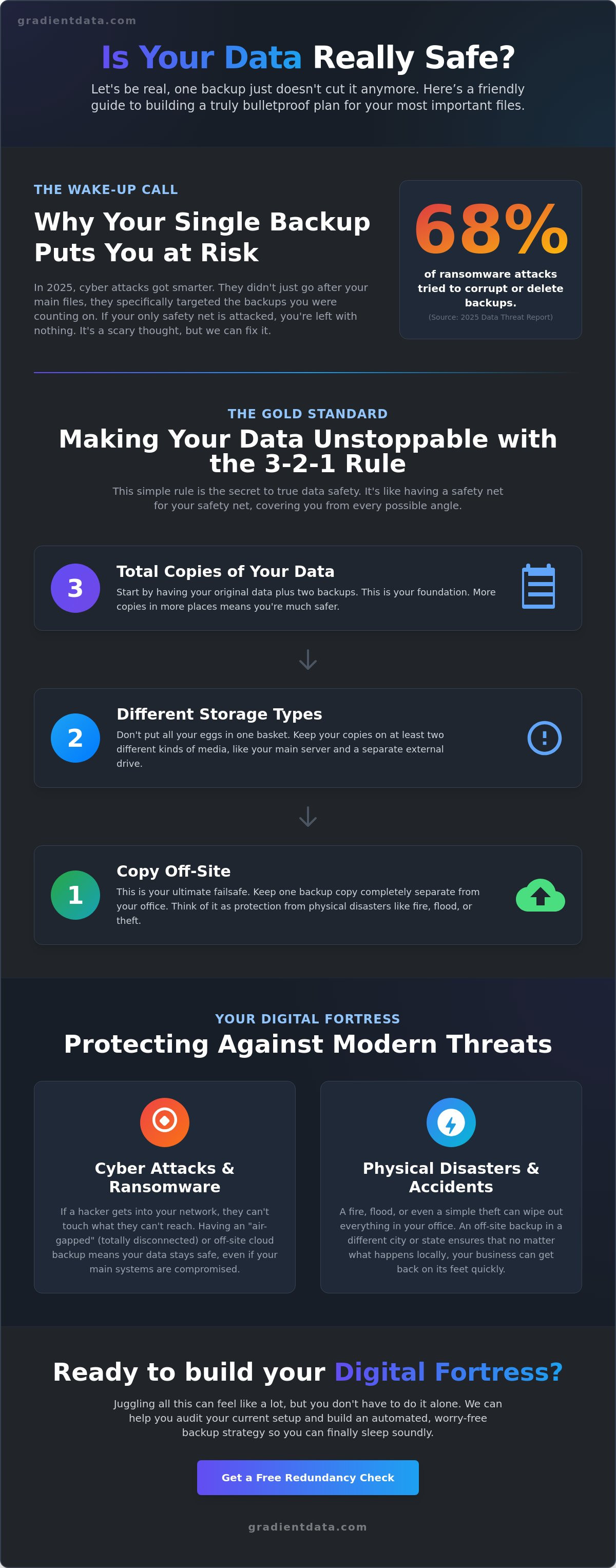
Did you know that in 2025, 68 percent of ransomware attacks specifically tried to corrupt or delete backup files? It is a startling wake-up call for every business leader who thinks a single cloud save is enough to keep their operations running. If you are relying on just one safety net, you are effectively one bad day away from losing years of hard work. This is why the strategy of maintaining a backup of backup has moved from a technical luxury to a fundamental business requirement in 2026.
I understand how overwhelming it feels to juggle different cloud and local options while worrying if your systems will actually work when you need them most. You have likely worked hard to set up your current infrastructure, and it feels like that effort should be enough. However, with the average cost of a data breach in the United States reaching 9.44 million dollars this year, we need to be more strategic than ever. I am going to walk you through why the old rules of data protection have changed and give you a simple checklist to build a bulletproof redundancy plan. You will learn how to implement the latest standards to protect, preserve, and recover your most valuable assets so you can finally sleep soundly.
Key Takeaways
Learn why having just one copy of your data is a major risk and how the "one is zero" rule can protect your business from a total loss.
Explore the strategy of keeping a backup of backup to ensure your files remain safe even if a cyber attack hits your first line of defense.
Discover how to organize your files across different locations and storage types to follow the gold standard for modern data safety.
Find out how to perform a quick audit of your most important files and set up automated systems that work for you every night.
See how professional monitoring keeps your recovery systems healthy so they actually work when you need them most.
Table of Contents
The Big Data Myth: Why One Backup is Really Zero Backups
Think about your car for a second. You probably have a spare tire in the trunk. That is your backup. But what happens if you get a flat tire and then realize the spare is also flat? That is where a roadside assistance plan comes in. It is essentially a backup of backup. In the business world, we often think that having one copy of our files on an external drive or a single cloud account means we are safe. But the truth is that if your only backup fails, you are left with absolutely nothing. This "one is zero" reality is why we need to move toward a more resilient model.
To see how this concept works in a lighthearted way, take a look at this video:
Modern threats have changed the game. In 2025, we saw that 68 percent of ransomware attacks tried to corrupt or delete backup files. If you have a drive plugged into your computer, a virus can jump from your main system right onto that drive and encrypt everything. Suddenly, your safety net is just as useless as the original files. By creating a 3-2-1 Backup Strategy, you ensure that even if one copy is hit, you have another one waiting in the wings. This is the core idea of a backup of backup. It is about having a safety net for your safety net so you never have to face a total data loss.
The danger of the single point of failure
A single point of failure is just a way of saying that one small mistake can ruin everything. It is like having a leaky roof right over the desk where you keep your server. If that roof gives way during a storm, both your computer and your backup drive could be destroyed at the same time. I have seen it happen with something as simple as a spilled cup of coffee on an external drive. If you keep your backup in the same room as your computer, you are taking a huge risk. Fire, theft, or even a power surge could take out both devices at once. Spreading your data out is the only way to stay truly protected.
The Modern Rulebook: Making Your Data Unstoppable
The 3-2-1 rule is a classic for a reason. It's the gold standard for keeping your business records safe. You start with three copies of your data. Two of those should be on different types of storage, like a server and a local drive. The final copy must be kept off-site. When you follow The Modern Rulebook: Making Your Data Unstoppable, you're essentially building a backup of backup that covers every possible angle. It's the most reliable way to make sure that even if one method fails, another is ready to go immediately.
We also need to talk about air-gapping. This is just a simple way of saying you keep one copy of your data completely disconnected from the internet. If a hacker gets into your network, they can't touch what they can't reach. This level of care is especially important for compliance management. If you work in healthcare, law, or finance, having these layers isn't just a good idea. It's often a legal requirement to ensure your client data is protected from modern cyber threats.
Why off-site and cloud backups are non-negotiable
If you're running a business in Miami, you know hurricane season is no joke. A single bad storm can lead to flooding or power surges that fry every piece of hardware in your office. That's why "off-site" needs to mean more than just the building next door. Your data should be physically located in a different city or even a different state. If your office is underwater, your data needs to be somewhere dry and powered up.
Using strategic cloud solutions makes this process easy and automatic. Instead of manually carrying drives home every night, the cloud sends your data to secure servers far away from local weather patterns. These cloud backups act as a reliable backup of backup by storing your files in multiple data centers at once. It gives you automated peace of mind because you don't have to remember to do it yourself. If you're curious about how your current setup compares to these standards, talking to a professional about your redundancy levels is a great first step.
Actionable Tips for Creating Your Own Safety Net
Building a backup of backup doesn't have to be a headache. First, take a quick look at where your most important files live right now, whether that is on your laptop, a central office server, or scattered across various team members' desktops. Knowing exactly what needs protecting is the first step toward true security. Next, set up an automated cloud backup to run every single night so you don't have to remember to hit a button. This follows the logic found in The Big Data Myth: Why One Backup is Really Zero Backups, which reminds us that a single copy is never enough for a growing business.
I also recommend adding a physical, encrypted drive to your routine. Keep this drive in a secure safe or an off-site location like a bank box to protect it from local physical damage. Redundancy is the practice of having multiple independent copies of your info so that no single failure can take you down. By combining a cloud version with a physical one, you create a layered defense that is incredibly hard to break. If you want someone to handle this technical heavy lifting for you, our managed IT services can ensure your data is always verified and ready for recovery.
Testing your backups: The part everyone forgets
A backup is only truly good if you can actually get your files back when things go wrong. I suggest running a simple fire drill where you try to restore one single folder every month just to see how long it takes and if the files are intact. It is a small habit that prevents a massive heart attack later. You should also make it a point to check your backup logs for errors at least once a week. These logs are just simple reports that tell you if the previous night's save was successful or if something got stuck. Catching a small error today means you won't be left empty-handed when you actually need that backup of backup to save the day.
How Gradient Data Solutions, Inc. Builds Your Digital Fortress
I know that setting up a truly resilient system can feel like a lot of work. Between air-gapping, cloud syncing, and physical drives, it's easy for a busy business owner to feel overwhelmed. That's exactly why we're here. We handle the heavy lifting of managed IT so you can stop worrying about your files and start focusing on growing your company. We don't just set your systems up and walk away. We take a proactive approach by monitoring your systems around the clock to ensure your recovery points are healthy and ready to go at a moment's notice. Our goal is to release the hidden value in your technology by making it work for you instead of against you.
Our team understands that a professional backup of backup strategy is your last line of defense, but we also want to make sure you never have to use it. Our cybersecurity services work hand-in-hand with your data protection plan to stop threats before they even reach your network. By catching a digital intrusion or a hardware glitch early, we keep your business running smoothly without the stress of a total shutdown. If you ever feel unsure about your current tech setup, I'd love for you to reach out for a friendly chat so we can look at your strategy together.
Managed services vs. DIY backups
Many business owners try to manage their own copies, but the time spent checking logs and swapping drives adds up quickly. When you choose a partner, you save yourself hours of frustration and protect your bottom line from the risk of a catastrophic loss. We act as a strategic partner for Miami businesses, providing the expert architect approach that keeps your data safe from both local storms and global cyber threats. We focus on the bridge between your raw technical inputs and tangible business value. It's all about giving you the peace of mind that comes from knowing your digital assets are in professional hands.
Take Control of Your Data Security Today
Protecting your hard work in 2026 requires more than just a single save button. We have explored how a single copy can easily fail and why a backup of backup is the only way to stay truly safe from ransomware or Miami storms. By adopting the 3-2-1 rule and committing to monthly restore tests, you are building a foundation that can survive almost anything the digital world throws at it.
Our local Miami team has spent over 21 years helping businesses secure their most valuable assets. We focus on proactive monitoring to catch small errors before they become major disasters, and we offer specialized support to help healthcare and finance firms meet tough compliance standards. You deserve a partner who understands the technical details so you can focus on your vision. Let's build a bulletproof backup strategy for your Miami business together!
Your data represents years of dedication and growth. Taking these simple steps today will give you the peace of mind to keep moving forward with total confidence.
Frequently Asked Questions
Is a cloud drive like Google Drive or Dropbox considered a real backup?
Cloud drives like Google Drive or Dropbox are primarily file synchronization tools rather than true backups. While they are great for collaborating with your team, they don't protect you from accidental deletions or ransomware. If a file is corrupted on your computer, the cloud drive will immediately sync that corrupted version. A professional backup of backup strategy uses separate software to save specific versions of your files that stay safe even if your live data is compromised.
How often should I be backing up my business data?
You should aim to back up your business data at least once every twenty-four hours. For most modern companies, setting up continuous data protection is an even better choice. This ensures that every change you make is saved in real time. If you wait a week between saves, you risk losing five full days of work. Automating this process removes the risk of human error so you never have to remember to click a button.
What happens to my cloud backup if a hurricane hits Miami?
Your cloud backup is typically stored in large data centers located far away from South Florida, making it safe from local weather events. While a hurricane might knock out the power at your Miami office, your data remains accessible from any device with an internet connection once you are back online. This geographic distance is a key part of a smart backup of backup plan. It ensures that a single physical disaster cannot destroy all your business records at once.
Do I really need an external hard drive if I already use the cloud?
Yes, having a local external hard drive is still a smart move because it allows for much faster recovery than downloading everything from the internet. If you need to restore a massive database, doing it over your local network takes minutes instead of hours or days. Think of the cloud as your long-term insurance and the external drive as your quick-fix solution. Using both together provides the redundancy needed to handle both small glitches and major system failures.
How much does a professional backup of backup strategy usually cost for a small business?
The cost of a redundancy strategy usually depends on the total amount of data you need to protect and how quickly you need to be back up and running. While I cannot give a specific dollar amount here, most small businesses find that the monthly investment is quite manageable compared to the high cost of recovery. You should check with a local provider to get a quote tailored to your specific storage needs and the number of devices in your office.

Article by
Jose Noriega