

Cloud Migration Checklist: A Friendly Guide for Miami Businesses in 2026
What if the next hurricane season didn't mean a single minute of downtime for your Miami business? It is a bold thought, but for 94% of enterprises already using the cloud in 2026, it is a daily reality. You likely feel that familiar spark of worry when you look at your local servers and think about the potential for data loss or hardware failure during a storm. We agree that moving your entire operation feels like a massive hurdle, especially when you want to avoid the 38% of projects that typically go over budget.
The good news is that you can unlock the full potential of your business with a cloud migration that feels manageable and clear. This guide provides a practical, jargon-free roadmap to help you navigate this transition with total confidence. You will discover how to lower your IT costs and empower your team to work securely from any location. We are going to walk through every step, from choosing your provider to keeping your data safe, so you can stop worrying about the weather and start focusing on your long-term growth.
Key Takeaways
- Learn how to move your data to a secure digital space that protects your business during Miami's hurricane seasons.
- Discover a simple way to inventory your files so you can delete digital junk and lower your monthly costs.
- Find out how to plan your cloud migration for after hours to avoid downtime and manage your internet capacity effectively.
- Get tips on choosing a local expert who avoids confusing jargon and focuses on the unique needs of South Florida companies.
What is Cloud Migration and Why Does Your Miami Business Need It?
Think of cloud migration like moving your office to a more secure, modern building that grows with you. Instead of being tied to physical equipment in a closet, you're moving your data and apps from local servers to a secure digital space. For Miami businesses, this ensures your files stay safe even if a major hurricane hits the city. To provide a clear definition, What is Cloud Migration is essentially the strategic shift from physical hardware to flexible digital platforms. With 94% of enterprises already using at least one cloud service in 2026, this move has become the standard for companies that want to stay competitive and resilient.
To better understand this concept, watch this helpful video:
The Big Benefits for Your Team
Scaling your business becomes much easier once you make the move. Scalability is the ability to add more digital space or computing power only when you need it, so you're never paying for resources you don't use. You'll also notice a boost in cost efficiency. Since you aren't maintaining physical hardware, you can stop paying for expensive server repairs and the specialized cooling systems they require. Most importantly, it gives your team total freedom. They can work securely from a local coffee shop or from home just as easily as they do from the office. This flexibility is a key reason why the cloud migration services market is projected to grow to $330.27 billion by the end of 2026.
Cloud Migration as Hurricane Protection
Physical servers sitting in a Miami office are a liability during the summer months. Heavy rain, flooding, and power surges can damage equipment and cause permanent data loss. When you move to the cloud, your information is stored in high-security data centers that are built to withstand extreme conditions. This shift is the ultimate way to protect your business continuity. For more tips on staying resilient, take a look at our guide on data backup & recovery in Miami to see how we help local companies stay safe.
Your Essential Cloud Migration Checklist for a Smooth Move
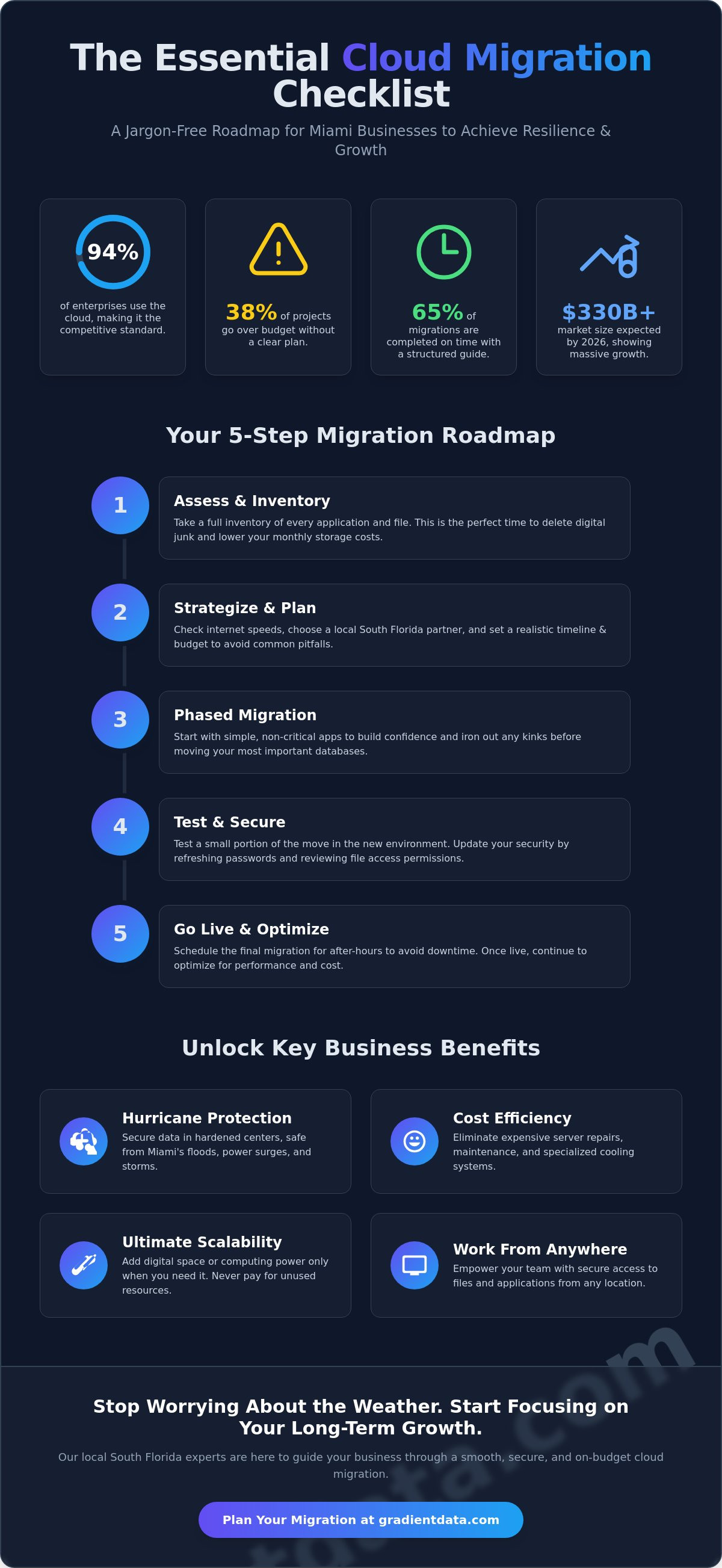
Getting your move right starts with a clear plan. While about 65% of cloud migrations are completed on time, having a structured guide keeps you from falling into the group that faces unexpected delays. You can find a great starting point with this resource on Your Essential Cloud Migration Checklist. First, you need to take a full inventory of every application and file your team uses daily. This is the perfect time to delete old files and digital junk. Moving unnecessary data is like paying movers to carry empty boxes; it just adds to your monthly storage costs without adding any value.
Next, check your office internet speed. A slow connection can turn a weekend move into a week-long headache. You should also look for a partner who offers local support in South Florida. Having an expert who can visit your Miami office if things get tricky provides a level of reassurance that a remote call center simply can't match. Picking your cloud partner involves more than just looking at prices. You want to compare specific features and ensure they have a track record of supporting businesses in our unique coastal environment.
Preparation and Strategy Steps
We always suggest moving simple, non-critical apps first. This helps your team build confidence and allows you to iron out any kinks before you tackle your most important databases. You should also set a realistic timeline. Since 38% of migrations exceed their original budget, giving yourself a buffer in both time and money is a smart move. Our focus on strategic cloud solutions ensures your technology goals align perfectly with your long-term business growth.
Security and Testing Before You Go Live
Testing is your safety net. This means trying out a small portion of the move to see how it behaves in the new environment before you commit to the whole thing. It is also the ideal moment to refresh your security posture. Update your passwords and review who has access to specific files to keep your data locked down. If you feel overwhelmed by these steps, our team provides managed IT support to handle the technical heavy lifting for you.
Common Migration Hurdles and How to Jump Over Them
It is natural to feel a bit of pressure when changing how your business operates. Many executives worry about their team sitting idle while files move. However, Common Migration Hurdles like downtime are easy to avoid when you schedule the heavy lifting for after hours. By moving data while your office is closed, you ensure everything is ready when the first cup of coffee is poured on Monday morning. You should also consider your bandwidth, which is just the amount of data your internet can handle at once. If your connection is a bit slow, a temporary boost can prevent bottlenecks. Most cloud migration issues are solved by good planning rather than more tech.
Team members sometimes get nervous about learning new software. You can help them by highlighting how the cloud allows them to work from anywhere without the clunky remote logins of the past. Providing a few simple training sessions before the switch can turn that anxiety into excitement. When people see how much faster they can find files, they usually become the biggest supporters of the move.
Keeping Your Data Secure During the Transition
Security is often the biggest hurdle in a business owner's mind. We use encryption to keep your files safe. Think of encryption as a way to lock your data in a digital vault where only you have the key. This ensures that even if someone intercepted the data during the move, they couldn't read a single word. Protecting your assets is vital, so feel free to check out our detailed guide on cybersecurity services in Miami for more ways to stay safe.
Managing the Cost of Moving
While there is an upfront cost to move, the long-term savings on hardware are huge. You stop paying for physical servers that break down or need constant cooling. Since 38% of migrations exceed their original budget, you should watch out for hidden fees in cloud storage contracts. Some providers charge extra for moving data out of their system, so it's smart to read the fine print. If you're ready to build a reliable budget for your move, our strategic cloud solutions can help you map out the costs accurately.
Choosing the Right Partner for Your Cloud Journey
Finding the right team to handle your cloud migration is just as important as the technology itself. You should look for a partner who skips the confusing tech talk and speaks your language. Since 55% of organizations now use two or more cloud providers in 2026, having a guide to help you choose between the major platforms is a huge advantage. We suggest prioritizing local Miami experts who understand the unique needs of South Florida, including the impact of local regulations like Florida Senate Bill 484. A great partner doesn't just move your files and disappear; they ensure your entire office is ready for the future by integrating services like VoIP, making your communication as flexible as your data.
The Value of Local Managed IT
Having a local safety net makes a world of difference for your peace of mind. Our managed IT services in Miami utilize an Expert Architect approach. Gradient Data Solutions, Inc. is more than just technical staff. We are strategic thinkers who plan your move from start to finish. This high-touch service is about unlocking the potential of your data, treating it as a dormant asset that only specialized expertise can activate. We handle the heavy lifting and technical nuances so you can focus on driving ROI and growing your company.
Next Steps for Your Business
You can take the first step today by performing a small audit of your current technology. Identify which apps are essential and which ones are just taking up space. It's a simple way to prepare for a more efficient future. You don't have to handle this transition alone. Gradient Data Solutions, Inc. provides the elite craftsmanship and technical expertise you need for a successful move. Let us help you plan a stress-free cloud migration today.
Secure Your Miami Business Future in the Cloud
Taking the leap toward a more flexible and resilient office is an exciting step for any South Florida leader. We have explored how a thoughtful inventory can save you money and how planning your move for after hours keeps your team productive. By choosing a local partner who understands the unique landscape of our city, you ensure your cloud migration is a smooth experience that actually drives growth.
Our team of Expert Architects at Gradient Data is ready to handle both the high-level strategy and the technical details. We provide local Miami support 24/7 and specialize in the strict compliance needs of the healthcare and finance industries. You don't have to navigate this transition alone or worry about the complexities of data security during the move. We are here to make sure your technology works for you, not the other way around.
Get your custom cloud migration plan from Gradient Data today. It's time to unlock your potential and build a business that is truly hurricane-proof and ready for whatever comes next.
Frequently Asked Questions
How long does a typical cloud migration take for a small business?
A typical transition usually takes between 3 and 6 months to complete from the initial strategy phase to the final go-live date. While smaller companies with fewer files might move faster, we prioritize a methodical pace to ensure no data is lost. About 65% of these projects are finished on schedule when a clear roadmap is followed. We work with you to set realistic milestones so your team knows exactly what to expect at every stage of the process.
Will my business have to stop working during the cloud migration process?
Your team can keep working without any major interruptions to your daily operations. We handle the heavy lifting during off-peak hours or over the weekend to ensure your systems are ready when you open for business on Monday morning. By using modern replication tools, such as the updates released in May 2026 for AWS, we can copy your data in the background. This allows your staff to stay productive while the digital move happens quietly behind the scenes.
Is the cloud really more secure than having a server in my own office?
The cloud is significantly safer than a local server because it isn't vulnerable to Miami's hurricane season or local power surges. Physical servers sitting in an office are prone to hardware failure, flooding, and even theft. In contrast, cloud providers use advanced encryption and multiple data centers to keep your information redundant. This means your data is stored in several high-security locations, making it much harder to lose than a single machine in a closet.
What happens to my old physical servers after we move to the cloud?
Once your cloud migration is finished, you can decommission your old hardware, recycle it, or even repurpose it. Some businesses choose to keep their old servers as a local storage point for non-critical files or as an extra backup layer. We always suggest a professional data wipe before you get rid of any equipment. This ensures that your old hardware doesn't contain any sensitive business information that could be accessed by others.
Can I move back to a physical server if I do not like the cloud?
You can move back to physical servers, but most businesses find the flexibility and cost savings too valuable to give up. This process is called repatriation, and while it is possible, it is rarely the best move for growth. Since the cloud market is expected to reach $330.27 billion in 2026, the vast majority of companies are moving toward digital platforms. If you ever feel restricted, we can help you design a hybrid setup that combines the best of both worlds.