

Data Backup & Recovery in Miami: Your Friendly Guide to Staying Safe in 2026
On a humid Tuesday in August 2026, you watch the local news as a tropical depression strengthens into a hurricane. You look at your office server and wonder if your current data backup & recovery strategy is truly safe or if your entire operation is one power surge away from disappearing. According to FEMA, 40% of small businesses fail to reopen after a major disaster, which is a statistic that hits home for those of us in South Florida.
It's a heavy feeling that many of our neighbors in Miami share. You likely already know that a simple thumb drive isn't enough, yet the technical debate between cloud storage and local hardware feels like a second job you didn't sign up for. We're going to change that today. You'll learn how to protect your Miami business from data loss with an actionable, bespoke template designed for our unique climate and risks. We'll walk through a clear plan that balances physical safety with digital speed so you can maintain peace of mind through every storm season.
Key Takeaways
- Think of your data like a digital spare tire that keeps your business moving even when the road gets rough.
- We explain the 3-2-1 rule, which is a simple way to make sure your information is saved in three different places so one mistake cannot wipe everything out.
- You will get a step by step guide to identifying your most important files, like client records and tax info, so you know exactly what to protect first.
- Discover how to choose a reliable cloud partner for your data backup & recovery needs to ensure your files are safe far away from any local weather risks.
- Learn how a bespoke approach to your digital setup can help you bounce back quickly and keep your Miami office running without any long delays.
Why Data Backup and Recovery is Your Miami Business’s Best Friend
Think of your business data like a digital spare tire. You don't drive across the Palmetto Expressway hoping you never get a flat; you keep a spare in the trunk just in case. In the context of your business, data backup & recovery serves that exact purpose. While a backup is the act of copying your files, recovery is the actual process of putting those files back where they belong after something goes wrong. If you want a foundational overview of data backup, it's essentially the safety net that ensures your business lives to fight another day.
To better understand the different ways you can save your information, watch this helpful video:
Starting over from zero is a nightmare that costs more than just a few dollars. It costs months of hard work and your hard earned reputation. In 2024, the average cost of a data breach for a business reached $4.88 million according to IBM. For a boutique firm in Coral Gables or Brickell, even a fraction of that cost could be devastating. Having a plan means you aren't just reacting to a crisis. You are following a logical path to safety.
The Local Reality: Hurricanes and Cyber Threats
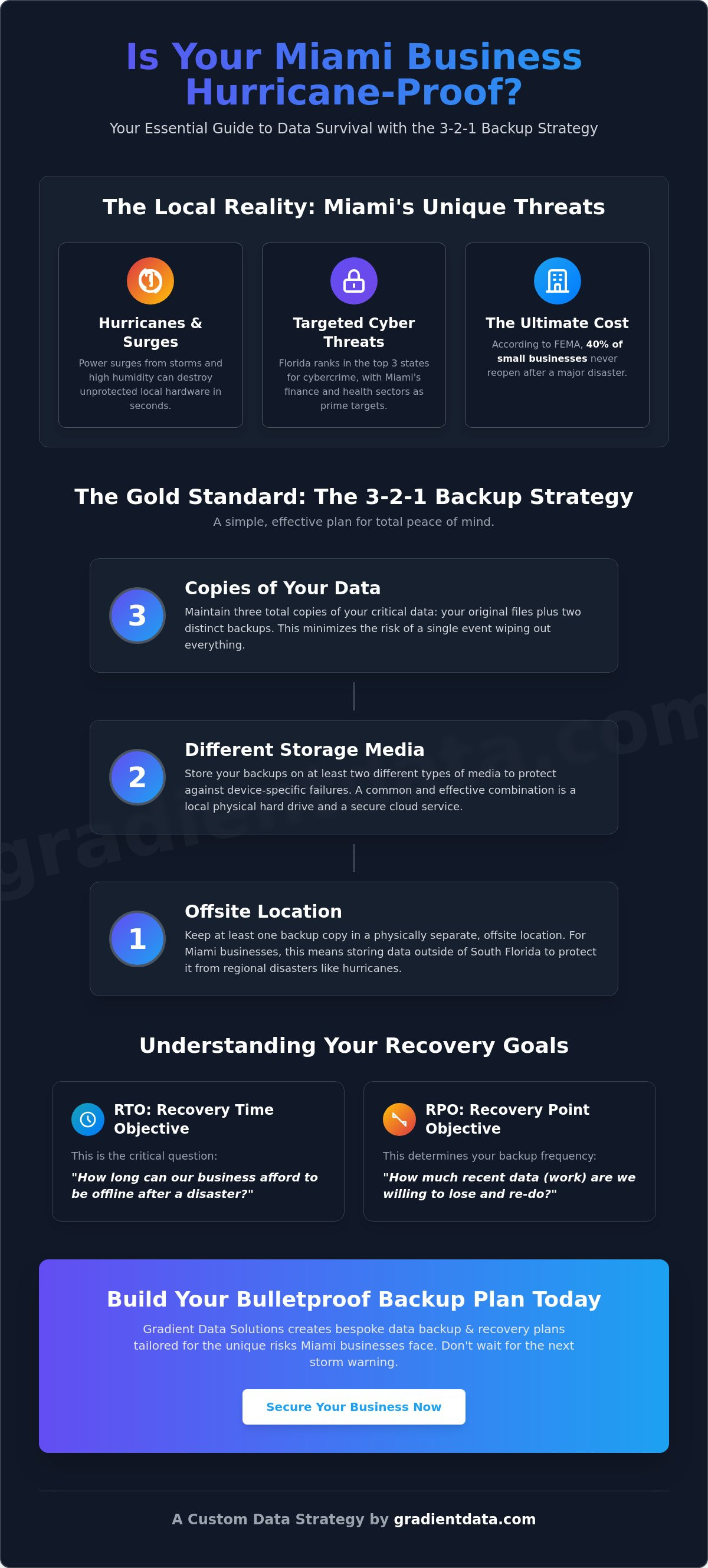
Miami presents some very specific challenges that don't exist in other parts of the country. Our summer thunderstorms bring more than just a cool breeze; they bring power surges that can fry an unprotected server in seconds. Even the high humidity can wear down local hardware faster than you might expect. Beyond the weather, our city is a major hub for finance and healthcare. These sectors are prime targets for hackers. In fact, a 2023 report showed that Florida ranks among the top three states for reported cybercrime. This makes a solid data backup & recovery plan and modern cybersecurity essential for staying compliant with local laws and keeping your client data safe.
The 3-2-1 Backup Strategy: A Simple Plan for Total Peace of Mind
If you have ever felt overwhelmed by technical advice, the 3-2-1 rule is about to become your new favorite tool. It is widely considered the gold standard for data backup & recovery because it is simple to remember and incredibly effective. The strategy is straightforward: keep three copies of your data, use two different types of storage media, and ensure one copy is kept offsite. This approach ensures that even if a local disaster strikes your Miami office, your business remains resilient and ready to recover.
Think of it as building layers of protection. You have your original files and two separate backups. If your primary computer fails, you have backup number one. If a power surge fries your local hardware, you have backup number two. By using two different storage types, such as a physical hard drive and a cloud service, you avoid having a single point of failure. Most importantly, keeping one copy outside of South Florida protects you from regional events like major hurricanes that could impact the entire city at once.
Making Sense of the Technical Stuff
You don't need a computer science degree to understand how this works. Cloud storage is simply a secure computer located in a different city that holds your files for you. When we talk about data backup & recovery, we focus on two main goals. First is your Recovery Time Objective (RTO), which is just a fancy way of asking "how long can you afford to be offline?" Second is your Recovery Point Objective (RPO), which asks "how much work are you willing to lose and redo?" Knowing these numbers helps you choose the right strategic cloud solutions for your specific needs.
Why a Backup of a Backup Matters
It is a common mistake to think that the cloud is invincible. Even the biggest tech companies can have bad days or service outages. This is why having a second copy is vital for your survival. If you want to dive deeper into the logistics, you can read about the importance of a backup of backup strategy. Having that extra layer means you aren't just hoping for the best; you are actively planning for it. If you ever feel stuck while setting this up, reaching out for a bit of professional it support can make the process much smoother.
Your Actionable Miami Backup and Recovery Template
Creating a data backup & recovery plan does not have to be a massive project that sits on a shelf. It is a living set of steps that keeps your business breathing when things go wrong. Let's break this down into four simple steps you can start today to ensure your data is safe by the time the next storm rolls through.
- Step 1: Audit your essentials. Not every file is a priority. Focus on your client records, tax documents, and accounting data first. If you are a medical office in Kendall or a law firm in Downtown, these are the lifeblood of your operations.
- Step 2: Pick a cloud partner. Choose a provider that stores your data in a facility far away from the South Florida flood zones. This ensures that even if our local grid goes down, your files are safe in a different geographic region.
- Step 3: Automate everything. Humans forget things, but software doesn't. Set your backups to run every evening or in real time. You should never have to remember to hit a save button to protect your company's future.
- Step 4: Define roles. Write down exactly who is in charge of starting the recovery. If you are out of the office during a flood, does your office manager know how to access the cloud?
Testing Your Plan Before the Storm Hits
A plan that hasn't been tested is just a piece of paper. It won't help you when the power is flickering. I recommend trying to restore a single folder at least once every 30 days. This simple check takes about 10 minutes but proves that your data backup & recovery system actually works. Also, don't forget the physical side of Miami business. Our average humidity stays above 70% for much of the year, which can cause dust to clump inside your server fans and lead to overheating. Check your local hardware for salt air corrosion or dust buildup every three months to prevent a hardware failure before it starts. If you want a team to handle these technical details for you, our managed IT services can take that weight off your shoulders.
How Gradient Data Solutions, Inc. Keeps Your Miami Office Running Smoothly
We don't just fix computers; we act as the expert architects for your entire digital world. At Gradient Data Solutions, Inc., we believe your business deserves more than a one size fits all approach. We design bespoke solutions that fit the specific needs of Miami SMBs. This means we look at your current setup and build a strategy that works for you. We design, we protect, and we scale your infrastructure so you can focus on reaching your goals. We handle the technical heavy lifting so you can spend your time growing your business. You can learn more about our managed IT services in Miami to see exactly how we keep things moving behind the scenes.
The Miami-Dade Beacon Council reported that our local economy grew by 3.4% in 2023, and we are here to ensure that growth isn't stunted by unexpected data loss. We take pride in being a boutique partner that offers elite craftsmanship for every client we serve. Our goal is to provide you with a custom built foundation that lets you sleep soundly even when the weather turns.
Boutique Service for Local Businesses
We are not a giant, nameless call center located halfway across the world; we are your neighbors right here in Miami. When you call Gradient Data Solutions, Inc., you are speaking to people who understand the local rhythm of business in South Florida. We know the specific challenges of the healthcare and finance industries, especially when it relates to data backup & recovery and local regulations. Our team ensures that your digital assets are not just saved, but managed with the care they deserve.
Staying safe in 2026 requires more than just a backup. It requires a shield. We invite you to check out our cybersecurity services for that extra layer of protection. By combining a solid data backup & recovery plan with proactive defense, we unlock the full potential of your business data. This comprehensive approach ensures that your operations remain resilient, no matter what challenges the future holds.
Securing Your Miami Business for the Years Ahead
You now have the essential tools to move from anxiety to action. By implementing the 3-2-1 strategy and following our local template, you ensure that a single storm or technical glitch won't end your hard work. It's about building a resilient foundation that protects your client data and your reputation. Remember that a plan only stays strong if you test it every 30 days and keep your hardware free from the heavy Miami humidity that we discussed earlier in this guide.
Our team has been proudly serving South Florida since 2010, which means we have seen every type of weather and digital threat our city can throw at a business. We are available 24/7 to provide specialized expertise in healthcare and finance compliance. You don't have to navigate data backup & recovery alone. We are ready to help you unlock the full potential of your digital infrastructure with a plan that is custom built for your specific goals. Taking this step today means you can focus on your vision while we handle the technical safety net.
Let’s build your custom Miami backup plan together!
Frequently Asked Questions
Do I really need a backup if I use Microsoft 365 or Google Workspace?
Yes, you absolutely need a separate backup because these platforms mainly protect their own infrastructure, not your specific files from human error or local hacks. Microsoft's own service agreement suggests using third party apps to keep your content safe. If a team member accidentally deletes a folder on a Monday in October 2026, those platforms might only keep it for 30 days. A dedicated plan ensures you can recover that folder years later.
How often should my Miami business back up its data?
You should back up your data at least once every 24 hours to stay ahead of potential losses. For fast paced industries like finance in Brickell, real time backups are even better. According to a 2023 industry report, 60% of businesses that lose data for more than 10 days go bankrupt within six months. Daily automation takes the pressure off your team and ensures you never lose more than one day of hard work.
What is the difference between a backup and a disaster recovery plan?
A backup is the act of copying your files, while a disaster recovery plan is the roadmap for how you use those copies to get back to work. Think of a backup as the spare tire in your trunk and the recovery plan as the jack and lug wrench you need to actually change the flat. A complete data backup & recovery strategy includes both the saved files and a written list of steps to follow during a crisis.
How much does data backup and recovery typically cost for a small business?
The cost varies based on how much data you have, but industry studies from 2024 show that small firms often spend between 1% and 3% of their total revenue on IT safety. While we don't set fixed prices here, investing in data backup & recovery is significantly cheaper than the $4.88 million average cost of a data breach. Many local Miami businesses find that a monthly subscription model fits their budget better than buying expensive servers upfront.
Can I just use an external hard drive for my business backups?
You can use an external drive as one part of your plan, but it should never be your only solution. A physical drive in your Miami office is vulnerable to the same floods and power surges that threaten your main computer. Following the 3-2-1 rule means you use that local drive for speed and a cloud service for safety. This way, if a storm hits your physical location, your files stay safe in a data center elsewhere.