

What Is Cloud Computing? A Friendly Guide for Your Miami Business in 2026
Last August, a local business owner sat in his office watching the sky turn that heavy shade of gray we all know too well. He wasn't just worried about his roof; he was thinking about the server humming under his desk that held every client record he owned. It's perfectly normal to feel a bit anxious when you see a storm brewing and realize your entire livelihood is tied to a physical box in a flood zone. If you've felt behind on technology or confused when people try to define cloud computing, you aren't alone. Most of us just want to know our data is safe and our budgets are smart.
You're about to discover exactly how the cloud works and why it's the ultimate digital insurance policy for your Miami business. We'll break down those confusing terms like IaaS and SaaS into plain English, show you how to save money by only paying for what you use, and explain how to keep your files safe even if your office loses power. By the time you finish reading, you'll see how shifting your workload can help you grow, protect, and future proof your company. It is time to stop worrying about the hardware in your office and start focusing on the value you provide to your clients.
Key Takeaways
- Learn how to define cloud computing in a way that actually makes sense, comparing it to your local utility company so you only pay for what you use.
- Discover the three main ways you can use these tools and why you are likely already using Software as a Service to manage your daily tasks.
- Understand how the cloud acts as a digital safeguard for Miami businesses, keeping your operations running even if a hurricane hits your physical location.
- Get a practical tip on how to test your office internet speed to ensure your connection is ready for a smooth transition.
- Find out how to protect your most important data from local disasters while reducing the amount you spend on physical servers and hardware.
Let’s Break Down What Cloud Computing Actually Means
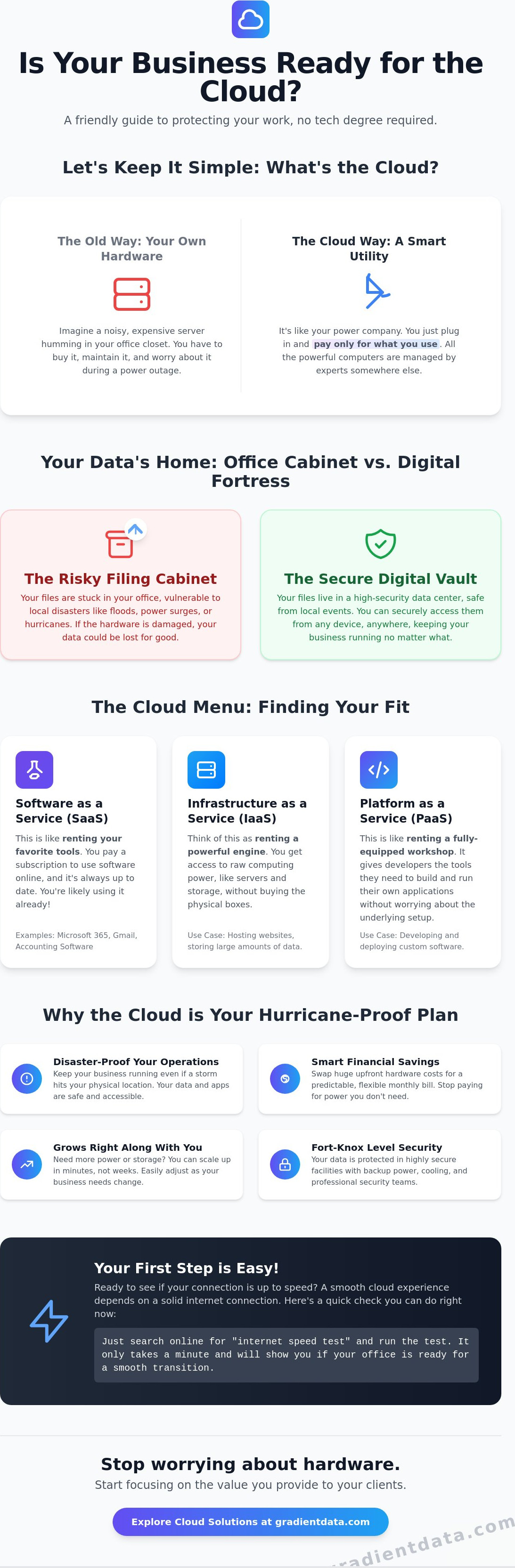
Think of the cloud like your local power company. You don't have a massive, noisy power plant sitting in your backyard; instead, you simply plug your devices into the wall and pay for the exact amount of electricity you consume each month. This is the simplest way to understand how modern business technology works. You are essentially using someone else’s incredibly powerful computers to run your programs and store your files over a secure internet connection. To help you understand what cloud computing actually means for your daily operations, it's helpful to realize you're likely already a pro at using it.
If you checked your Gmail this morning or scrolled through a social media feed on your phone, you were interacting with the cloud. When we define cloud computing, we're talking about moving away from expensive, fragile hardware in your office. Cloud computing is a service that lets you access technology resources like storage and software over the internet instead of keeping them on your own physical computer.
To better understand this concept, watch this helpful video:
The Difference Between Local Storage and the Cloud
Local storage is like keeping a single filing cabinet in your Miami office. It’s convenient until a pipe bursts or a hurricane brings in unexpected floodwater. Once that physical cabinet is damaged, those files are often gone for good. Cloud storage is more like having a secure, fireproof vault in a different state. You can peek into that vault through a magic window, which is your web browser, whenever you need to work. Your files stay dry and safe regardless of what happens at your physical desk.
Why the Name Cloud Can Be A Bit Confusing
The name suggests something fluffy and floating in the sky, but the reality is much more grounded. Your data actually lives in massive, high-security buildings known as data centers. These facilities are built with incredible layers of protection. They stay online with backup generators and redundant cooling even when the power goes out in the surrounding city. Using Cloud Services means your business logic is hosted in a fortress rather than a standard office closet. It’s about reliability and peace of mind for any business owner who wants to define cloud computing by the value it adds to their security.
The Three Main Ways You Will Use the Cloud
Understanding the different service models can help you define cloud computing for your specific business goals. There are three main categories you should know about, and it is very likely that you are already using at least one of them to get your work done today. When you define cloud computing through these three lenses, it becomes much easier to see where your technology budget is actually going and how it helps you grow.
Software as a Service: Your Most Common Starting Point
Software as a Service, or SaaS, is the most common way to interact with the cloud. Instead of buying a software disk that becomes outdated in a year, you rent access to tools like Microsoft 365 or your favorite accounting software over the internet. These tools update themselves automatically, which means you never have to worry about manual installations or security patches. Your team can simply log in from anywhere and start working.
Actionable Tip: Take a look at your monthly business credit card statement today. Highlight any recurring software subscriptions; these are likely your current SaaS products. Knowing this helps you see how much of your business is already successfully running in the cloud.
Renting Servers Instead of Buying Them
Infrastructure as a Service (IaaS) is a total game changer for Miami businesses that want to avoid the heat and noise of physical hardware. Instead of purchasing a loud metal box to sit in a closet, you rent virtual server space. This model allows you to protect, scale, and optimize your digital assets without a massive upfront investment. You can increase your storage or processing power in minutes as your company grows, rather than waiting for new equipment to ship and be installed. Many local owners find that strategic cloud solutions offer a much more flexible way to manage their long term growth.
The Developer’s Workspace
Platform as a Service (PaaS) is the third category, and it is primarily designed for teams that build their own custom applications. It provides a digital environment where developers can create and test software without having to manage the underlying hardware or operating systems. While you might not use this as often as SaaS or IaaS, it is the engine that allows for the rapid creation of the apps we use every day. Each of these three models works together to ensure your business stays agile and competitive.
Why the Cloud Is a Game Changer for Miami Businesses
For those of us living and working in South Florida, the cloud is much more than a convenient way to store photos. It is a vital part of your hurricane preparation strategy. When we define cloud computing for a local business owner, we aren't just talking about technology; we are talking about a digital insurance policy. If a major storm hits and your office loses power or sustains physical damage, your business can keep running from any location with an internet connection. Your team can stay productive from a home office or an evacuation center while your data remains untouched by the weather.
As we explored the three main ways you will use the cloud earlier, it's clear that shifting the heavy lifting to a provider offers a level of security that most small businesses simply can't afford on their own. Instead of relying on a single server in a closet, your operations are backed by massive data centers with redundant power and elite security protocols. This shift doesn't just protect you from disasters; it helps you define cloud computing as a tool for professional growth and peace of mind.
Surviving Hurricane Season with Digital Resilience
Traditional hardware is incredibly vulnerable to our local climate. If your primary server is sitting in a flood zone, your entire company is at risk. Using data backup and recovery strategies that prioritize the cloud ensures your records are stored safely offsite. This means that even if your building is inaccessible, your files aren't trapped on a dead machine. Remote work becomes a seamless transition rather than a desperate scramble, allowing you to focus on your family's safety during a storm instead of worrying about your hard drives.
Cutting Down on Hidden Office Costs
There is also a significant financial benefit to moving away from physical hardware. Running and cooling a dedicated server room 24/7 in the Miami heat is a massive drain on your electricity bill. By utilizing managed IT services, you can effectively manage these cloud costs and eliminate the need for expensive, high-maintenance equipment in your office. You'll save money on hardware refreshes and the specialized staff needed to keep them running. If you're ready to see how a more resilient setup can protect your bottom line, our team can help you build a plan that fits your specific needs.
Taking Your First Steps Toward the Cloud
Starting your journey doesn't mean you have to flip a switch and move your entire office overnight. In fact, most successful businesses take it one step at a time. When you define cloud computing for your own specific workflow, it is often best to pick one or two small projects to get your feet wet. This approach lets your team get used to the new tools without the stress of a total overhaul. It's all about making progress at a pace that feels comfortable for you and your staff.
Before you move a single file, you need to check your foundation. Actionable Tip: Head over to a speed test site and check your office internet connection today. Pay close attention to your upload speed, not just the download speed. Since the cloud involves sending data back and forth, you'll want to make sure your connection is fast enough to handle the extra traffic without slowing down your team. If your speeds are low, that's the first thing to address with your provider.
A professional IT audit can identify which of your current tools are ready for a cloud migration and which need an upgrade first. This audit helps you avoid surprises and ensures that your transition is as smooth as possible.
Choosing Your First Cloud Project
For most Miami teams, moving your email or basic file storage is an easy first win. It is a great way to see immediate benefits, like being able to access your inbox from your phone or sharing a document with a coworker in seconds. Implementing strategic cloud solutions can simplify this transition, making sure your staff feels supported and confident as they learn the new system. You'll quickly see how much easier it is to collaborate when everyone is looking at the same version of a file.
Finding the Right Support for Your Journey
You don't have to go it alone. Moving to the cloud is a big step, and having a local team that understands the Miami market makes a world of difference. Look for a partner who can provide the help desk support your employees will need during the first few weeks. Choosing a provider that offers managed IT ensures that everything stays running smoothly behind the scenes. This lets you focus on your customers while the experts handle the technical details of your new digital office.
Securing Your Digital Future in the Sunshine State
By now, you can see that moving to the cloud is about much more than just following a trend. It's about building a resilient, flexible foundation that protects your hard work from local challenges like hurricane season. Whether you want to lower your monthly electricity bills or ensure your team can work from anywhere during an evacuation, these tools provide the reliability you need. How you choose to define cloud computing for your specific office will likely depend on whether you are starting with simple email storage or moving your entire server infrastructure to a secure data center.
Our local Miami support team is here to help you navigate this transition with confidence. We are specialists in hurricane-proof IT strategy and have extensive experience handling expert cloud migrations for medical and legal firms. You don't have to tackle this alone or worry about the technical details. Ready to see how the cloud can protect your Miami business? Let’s chat about your tech goals!
Taking that first step toward a more modern office is an exciting move for any business owner. With the right plan in place, you'll spend less time worrying about your hardware and more time growing your company. We're looking forward to helping you succeed in 2026 and beyond.
Frequently Asked Questions
Is cloud computing safe for my sensitive business data?
Yes, cloud computing is generally much safer than keeping data on a single office server because providers use advanced security that most small businesses can't afford. Your data is encrypted, which means it is scrambled so only authorized users can read it. High end data centers also have physical guards and backup power systems to ensure your information is protected from both hackers and physical theft. It is like moving your cash from a shoebox to a bank vault.
How much does it cost to move my business to the cloud?
The cost varies depending on which tools you choose, but most businesses save money over time by switching to a pay as you go model. Instead of buying expensive hardware every few years, you pay a monthly fee for only the resources you actually use. This helps you avoid large upfront expenses and reduces your electricity bills since you aren't running a hot server room all day. It makes your monthly budget much more predictable.
Do I need a special internet connection to use the cloud?
You don't necessarily need a special fiber line, but you do need a reliable business grade connection with a decent upload speed. Since you are sending files back and forth, a slow connection can make your team feel frustrated. It is a good idea to check your current speeds before you start to define cloud computing needs for your specific office workflow. A simple speed test can tell you if your current plan is ready for the transition.
What happens to my data if the cloud provider goes out of business?
Major providers are extremely stable, but it is always smart to maintain a plan for data portability. You can work with a partner to ensure your files are regularly backed up to a second location or even a different provider. This strategy ensures that you always own your data and can move it if your primary provider ever changes their services. Keeping a secondary backup is a standard part of a smart, professional digital strategy.
Can I still access my files if my office internet goes down?
Yes, you can still work by using a mobile hotspot or by setting up certain apps to work in offline mode. Many modern software tools allow you to keep working on a file without an internet connection and then sync your changes once you are back online. For a Miami business, this is a huge benefit because it means a local power outage or a minor internet glitch doesn't have to stop your team from being productive.